Accounting and professional services setup
Does this pack fit an accounting, audit, tax or consulting firm?
It fits a firm whose product is chargeable hours. The work is named — an audit, a return, an advisory piece — and it belongs to a client who will read the bill.
What it switches on
Section titled “What it switches on”| Setting | Value | Default, for comparison | Why |
|---|---|---|---|
| Work mode | Task based | Task based | Every hour must attach to something you can charge for |
| Tracking | A task must be picked first | — | An hour with no engagement on it cannot be billed |
| Screenshot interval | Every 5 minutes | Every 5 minutes | Evidence behind a chargeable hour, if a client asks |
| Idle threshold | 10 minutes | 3 minutes | Reading a file and checking a ledger look identical to a keyboard |
| Retention | 365 days | 90 days | An engagement is argued about long after it closes |
What it creates
Section titled “What it creates”- 4 productivity roles — Accountant, Audit associate, Tax preparer and Partner
- 384 app rules — every role gets a verdict on all 96 applications and websites in the catalogue
- 3 teams — Audit, Tax, Bookkeeping
- 1 daily goal — 360 productive minutes
- 3 alert rules — not started by 10:30, idle over 60 minutes, distracting use over 75 minutes, all to managers
The rules treat the ledgers and the statutory portals as the work, because in this firm they are. An accountant gets Tally, QuickBooks, Xero, Zoho Books, the GST portal and the income tax e-filing portal. A tax preparer gets ClearTax instead of the ledgers. An audit associate gets the MCA portal and SAP.
One small, deliberate difference: LinkedIn is neutral for a partner, not productive. A partner has a real business-development reason to be there; the pack declines to score it either way.
The one thing it gets right
Section titled “The one thing it gets right”Time belongs to a client, not only to a project.
A software team thinks in projects. A firm thinks in clients: one client can carry four engagements at once, and the bill is one bill. The pack sets up the project and task structure so a client name sits above the work, and the monthly client billing report adds up the way the invoice does.
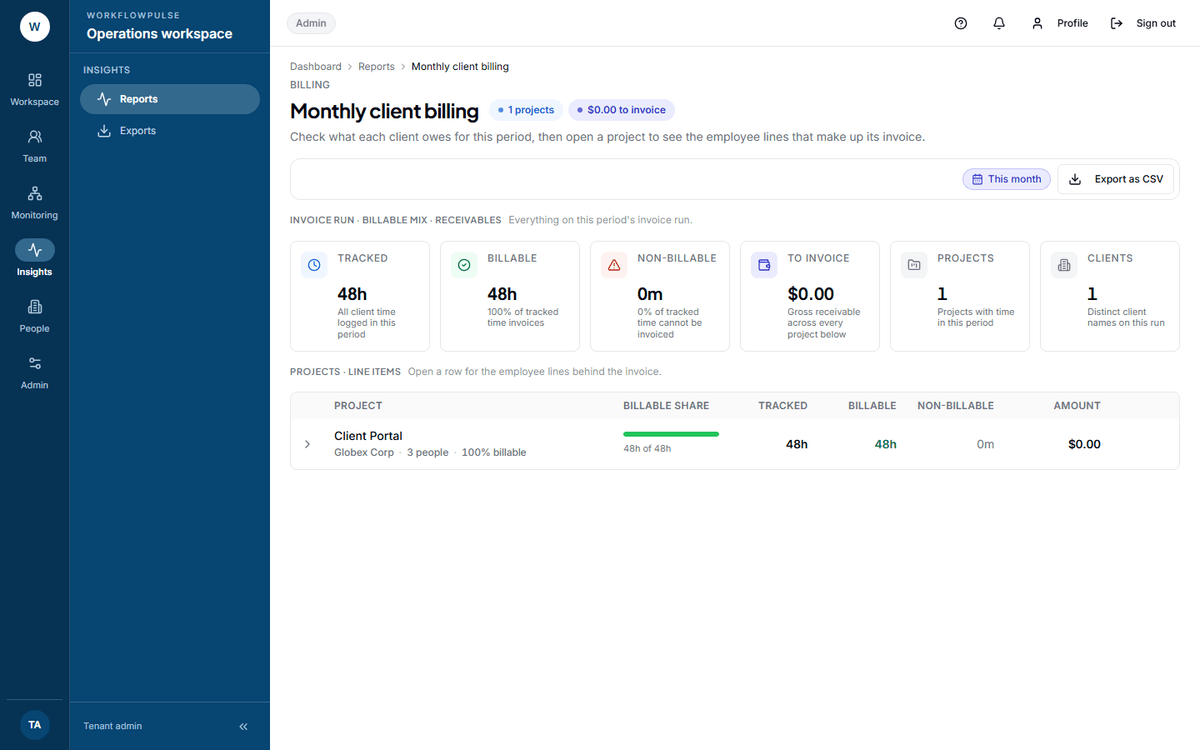 This is the report the pack exists to make correct. If a client name is missing from it, the hours
were attached to a project that was never tied to a client — a setup problem, not a tracking one.
What to change after you apply it
Section titled “What to change after you apply it”- Create one project per client before anyone starts tracking. Hours with nothing to attach to are hours you argue about later.
- Decide who approves a timesheet, and tell them. Nothing is billable until it is approved.
- Check the billing reports read the way your invoice reads. See Billing reports.
Next: Task based or productivity only · Inviting your people