Setting up a workspace
What has to be decided before anyone starts tracking?
Six things. The setup wizard at /onboarding asks them in order and writes nothing until the
last step.
| Step | The question it asks | What it sets |
|---|---|---|
| 1 · Company | What kind of company is this? | The pack. Five industries, or start blank |
| 2 · Counting | How does work get counted? | Task based, or productivity only |
| 3 · Roles | Which roles do you have? | The productivity roles, with their app lists |
| 4 · Recording | What is recorded, and for how long? | Screenshot interval, idle threshold, retention |
| 5 · People | Who is in it? | Teams, invitations, a role for each person |
| 6 · Review | Review and apply | Everything, in one go |
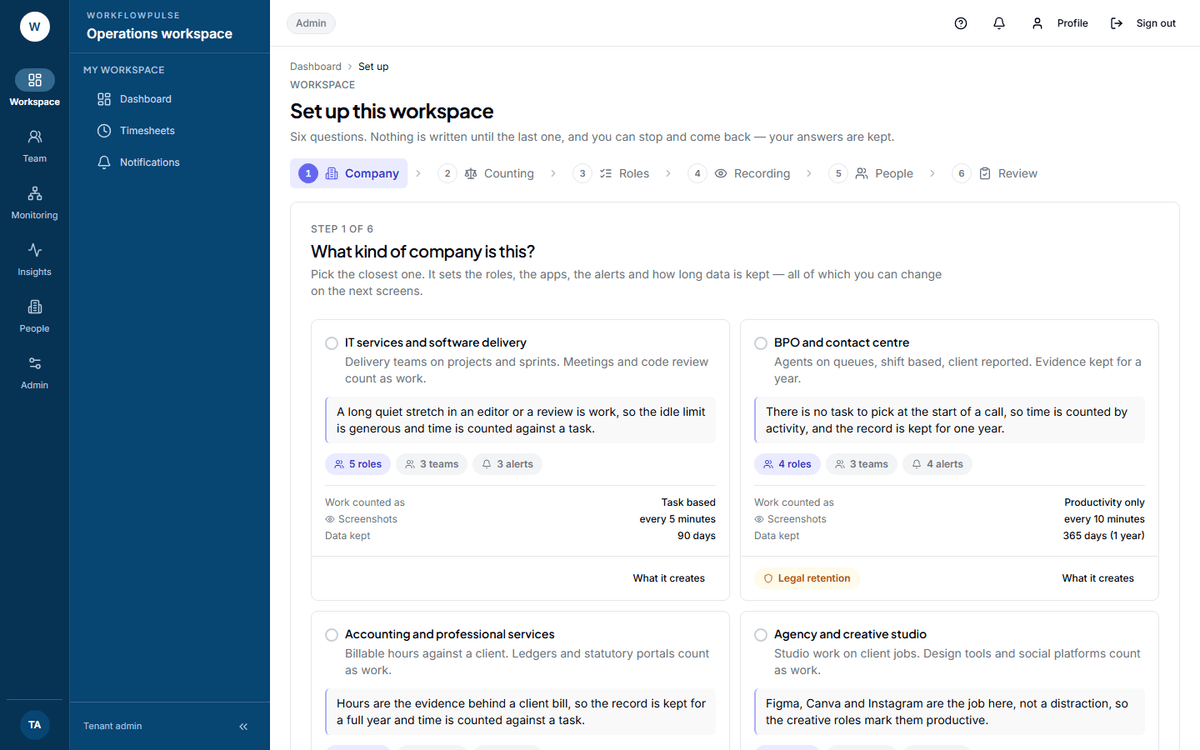 The rail on the left is also the progress bar. Each step states the question in plain words and
one line on why it is being asked, so you are never guessing what a field is for.
Two of the six matter more than the rest
Section titled “Two of the six matter more than the rest”Steps 1, 3 and 5 are all changeable in a minute afterwards.
Nothing is written until step 6
Section titled “Nothing is written until step 6”Steps 1 to 5 only collect answers. Step 6 shows you the list before any of it happens:
- every productivity role, team, alert rule and goal about to be created
- every setting about to change, with the old value beside the new one
- a skip line for anything that already exists under that name
- a warning for a choice that fights the pack — retention under a year on a pack that needs a year, or screenshots switched on in a pack that deliberately has them off
Then one button writes all of it together. If any part fails, none of it is written.
When it is done
Section titled “When it is done”Step 6 hands you a rollout note: a short page that says what you switched on, written for the people who will be tracked. Do not skip it.
The research behind this product is blunt about why. Rollouts of this kind of tool fail when the tool is handed over with no explanation of why it exists, who can see the data, or how it changes a person’s day. The note exists so that does not happen to you. It links to What is recorded about you, the one page every employee should read before their first tracked day.
Read next
Section titled “Read next”The first week after setup
Section titled “The first week after setup”Give it a week before you judge any number. The first few days of a rollout contain more setup mistakes than they do behaviour.