Approving timesheets
How do you approve a timesheet?
Open Timesheets (/timesheets). It opens on the Submitted tab, which is your queue.
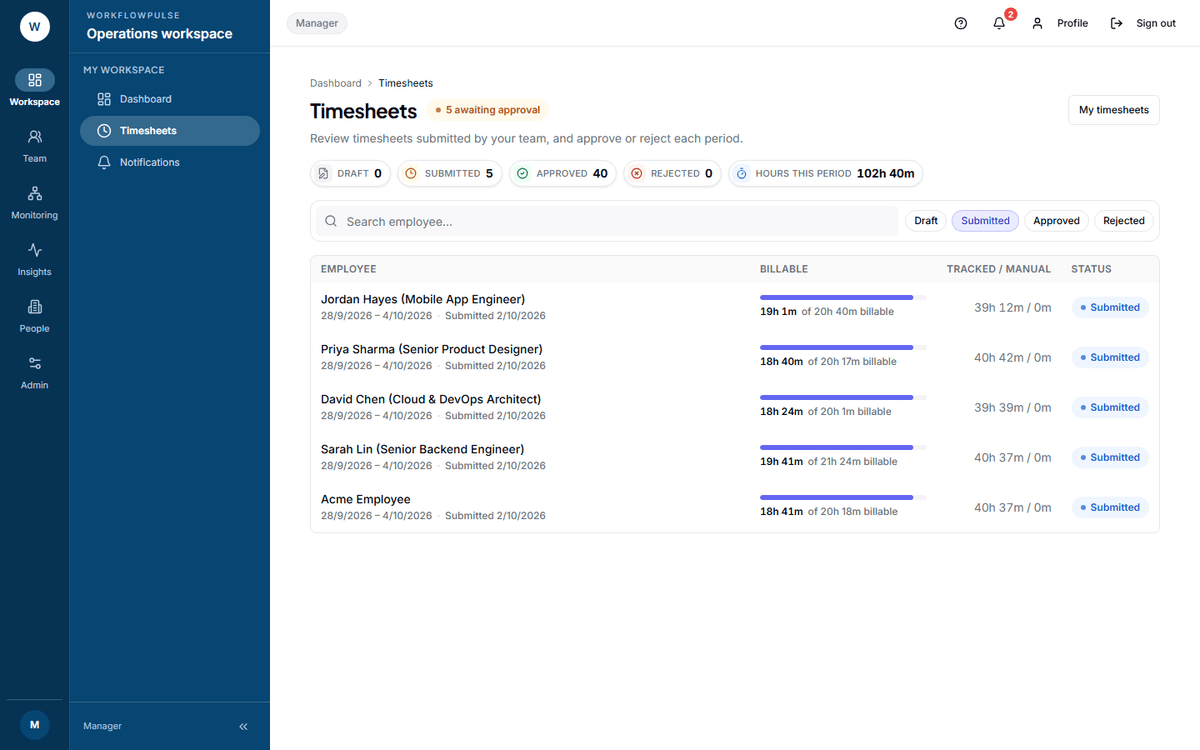 The queue is a list, not a workbench. Nothing is decided here: the employee name is the only link, and it opens the one timesheet.
The queue
Section titled “The queue”Five figures across the top. The first four filter the list.
| Tile | The hint under it |
|---|---|
| Draft | Not yet submitted |
| Submitted | Awaiting your approval |
| Approved | Decided and closed |
| Rejected | Sent back for correction |
| Hours this period | Total logged across the queue you are looking at |
The table has four columns.
| Column | What it tells you |
|---|---|
| Employee | The name, the period, and when it was submitted. Click it to open |
| Billable | A bar, and how much of the total can be charged |
| Tracked / manual | Tracked time first, then time added by hand |
| Status | Where it is |
Deciding one
Section titled “Deciding one”Click the name. The detail page opens with three figures - Submitted total, Billable and when it was submitted - then the breakdown.
-
Is the total plausible for the period? A 60-hour week and an 8-hour week both deserve a look.
-
How much of it is manual? Read the Time breakdown card: tracked activity on one side, manual time on the other. Tracked time has evidence behind it. Manual time has a sentence.
-
Did they leave a note? The Employee notes card only appears when they wrote one. It usually answers the thing you were about to ask.
-
If anything is unclear, press View activity timeline. It opens their day: sessions, applications, idle gaps, screenshots. That is the evidence.
-
Approve or Reject, with a note in Notes (optional).
Skip sends you back to the list without deciding. It records nothing and the timesheet stays in the queue. Use it when you need to ask something first.
The note is the job
Section titled “The note is the job”On an approval the note is optional and usually unnecessary. On a rejection it is the whole thing. The employee sees exactly what you write and nothing else.
Write what to fix:
| Good | Thursday shows 11 hours with 4 hours manual and no reason given. Add the reason and resubmit. |
| Good | This period includes two days of leave. Remove them and resubmit. |
| No use | Incorrect. |
| No use | Please check. |
When they resubmit the same dates it reuses the same timesheet, so the history stays in one place.
Who can do what
Section titled “Who can do what”| Role | Sees the queue | Can decide |
|---|---|---|
| Manager | Yes | Yes |
| Tenant admin | Yes | Yes |
| Auditor | Yes | No |
| Employee | No - sent back to My timesheets | No |
An auditor reaching a submitted timesheet gets no decision card. That is deliberate.
The history
Section titled “The history”Every timesheet carries a History table: When, Transition, Actor and Notes. One row per status change.
The transition is written in the product’s own words - submitted → approved - not the badge labels on the list.
That table is what gets read months later when somebody questions an invoice.