Desktop agent versions
How do you publish a new desktop tracker build?
Desktop versions (/platform/desktop-versions). Platform super admin only — everybody else gets “Platform super admin role required to manage desktop versions.”
This is the registry the desktop app checks when it looks for an update. The screen describes itself accurately: clients are offered the latest active version for their operating system and channel, and are forced to upgrade below the minimum supported version.
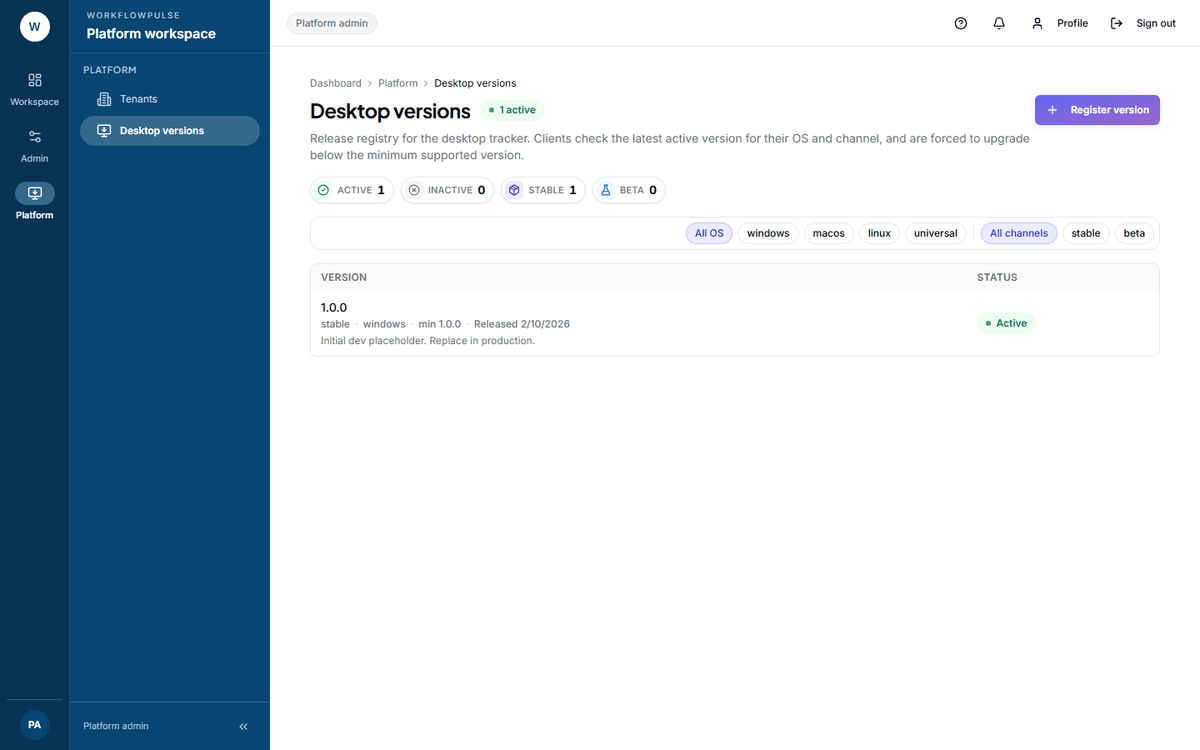 Every build on one row, with its channel and minimum supported version in the meta line. The four tiles follow the filters, so they count what is on screen rather than everything registered.
Registering a version
Section titled “Registering a version”Press Register version.
| Field | What it is |
|---|---|
| Version | The build, for example 1.4.0 |
| Min supported | Below this, clients are forced to upgrade |
| OS | windows, macos, linux or universal |
| Channel | stable or beta |
| Download URL | Where the build is fetched from |
| SHA-256 | Optional. Exactly 64 hex characters if given |
| Release notes | Optional |
Releasing in a sensible order
Section titled “Releasing in a sensible order”- Register it on beta and point your own machines at that channel.
- Leave it a week. Watch for tracking integrity reports and errors.
- Register the same build on stable.
- Leave the minimum supported alone.
- Raise the minimum only once the new build has been out long enough that raising it moves few people.
The row actions
Section titled “The row actions”Download build opens the download URL. Use it to check the link works before anybody else needs it — a registered version with a dead URL fails silently on the customer’s machine.
Deactivate version stops it being offered. It asks first — “Deactivate windows/stable 1.4.0? Clients will stop being offered it.” — and it does not remove it from anybody who already has it. Already-inactive rows have the action disabled.
What the registry does not have
Section titled “What the registry does not have”No rollout percentage. A version is offered to everybody on that operating system and channel, or to nobody. There is no staged rollout.
No draft state. Registering a version publishes it. Prepare it on the beta channel instead.
No reactivate. Deactivating is one way. To offer a build again, register it afresh.
No per-customer pinning. Every workspace on a channel gets the same answer.