What an auditor can see
What can you see, and what can you prove?
The auditor role is read-only across the whole workspace. This page lists the ten questions an auditor usually arrives with, and says honestly which ones the product answers.
What read-only means here
Section titled “What read-only means here”You can open every screen a tenant admin can open, except the ones that change configuration. You can read every report, every screenshot, every timesheet and the audit log.
You cannot edit a record, approve a timesheet, change a setting or delete anything. The refusal is enforced on the server, not hidden in the interface.
The ten questions
Section titled “The ten questions”| # | The question | Where | Answered? |
|---|---|---|---|
| 1 | Show me the evidence for one person over a period | Timeline, Timesheet detail, Exports | Partly |
| 2 | Was anything changed after it was captured? | Audit logs | Yes |
| 3 | Who accessed this employee’s data, and when? | - | No |
| 4 | Can I export a period without altering it? | Exports | Yes |
| 5 | What is the retention rule, and when does this data die? | Settings | Partly |
| 6 | Which admin changed which policy, and when? | Audit logs | Yes |
| 7 | Do two reports of the same period agree? | - | No flag |
| 8 | Was notice given to this person, and when? | - | No |
| 9 | Is monitoring configured within what we told employees? | Settings, Productivity rules | Partly |
| 10 | Can I do all of this without being able to change anything? | The role itself | Yes |
The rest of this page works through them.
1. Evidence for one person over a period
Section titled “1. Evidence for one person over a period”Timeline (/reports/timeline) is the strongest screen in the product for this.
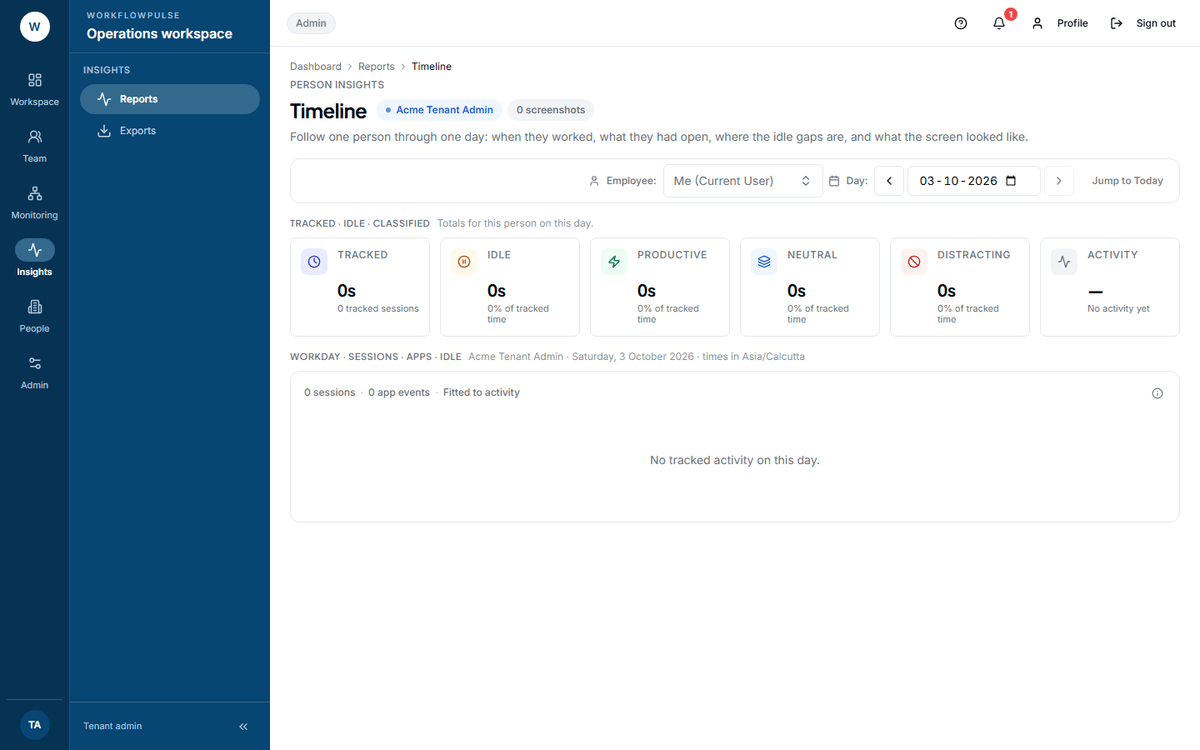 Pick the person, pick the day. Everything that was recorded about that person on that day is on this one screen, including the window titles and every screenshot.
For a period, use Timesheet detail for the day-by-day totals, and an export for the rows.
Two things that weaken a timesheet as evidence in your hands:
- A CSV or Excel export carries only a header row. Only the PDF carries a generated-at line. See Exports and evidence.
- On a timesheet detail page, the people list is only loaded for a reviewer. As an auditor you get raw user ids - the employee reads “Unknown”, and the History table shows ids instead of names. Note the id against the person yourself, or ask an admin for the screen.
2 and 6. What changed, and who changed it
Section titled “2 and 6. What changed, and who changed it”Audit logs (/audit-logs) answers both well: “Every recorded change in your tenant, newest first.”
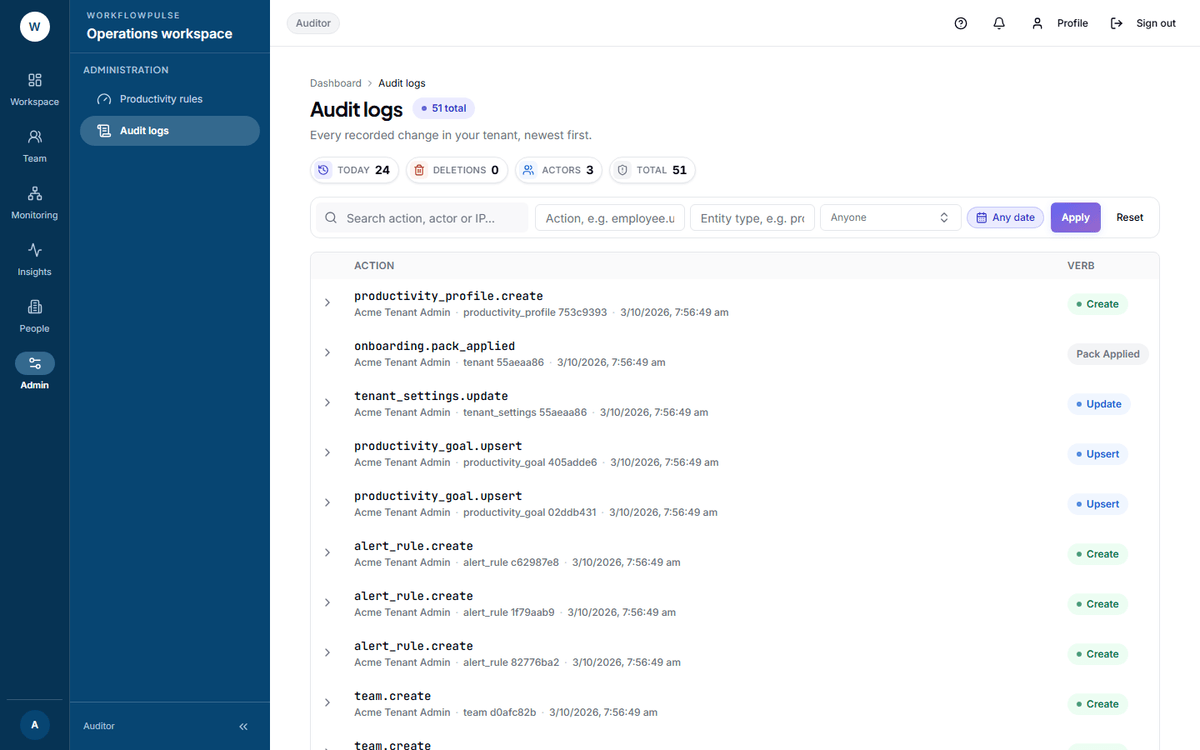 Expand any row and you get the record as it was and as it became, side by side, with the actor’s name and IP on the line above.
Filter by action, by entity type, by actor and by date window, then press Apply. Audit logs are not deleted by the retention job - they outlive the data they describe.
Only a tenant admin and an auditor can open this screen. A manager cannot: “Audit logs needs the tenant admin or auditor role.”
3. Who accessed the data
Section titled “3. Who accessed the data”Roughly sixty actions are audited, and every one of them is a change - create, update, delete, approve, assign, suspend. None is a read.
Three are monitoring-adjacent, and they are what you have:
| Audited action | What it proves |
|---|---|
live.capture_request |
A manager or admin asked for an on-demand screenshot, with both names |
screenshot.upload |
A screenshot was taken |
screenshot.delete |
A screenshot was removed, and by whom |
Nothing records a view. It is worse than an omission: a screenshot image is served against a short-lived signed link with no sign-in on the request at all, so there is no identity to log even in principle.
If your framework requires an access log for monitoring data, this product does not produce one. Say so, rather than look harder.
5. Retention
Section titled “5. Retention”Settings → Workplace policies → Data retention (days) holds one number for the whole workspace. A nightly job at 03:30 UTC permanently deletes screenshots, activity counts, application and website records, idle periods and integrity checks older than that.
Three honest limits:
- One number for every data type. You cannot keep screenshots for 30 days and activity for 365.
- No screen shows the oldest record actually held. The policy is visible; compliance with it is not displayed. Verify it with a query, not with a screen.
- Hours are kept for ever. Time logs, sessions, timesheets, daily totals, audit logs and exports are not purged. Retention governs the evidence, not the record.
7. Do two reports agree
Section titled “7. Do two reports agree”There is no restatement flag anywhere. If a closed period changes after somebody exported it, no screen says so.
What you have instead: the audit log will show the change, and a PDF export records the moment it was generated. Comparing two exports of the same period is a manual job.
8 and 9. Notice and consent
Section titled “8 and 9. Notice and consent”You can read the live configuration - every capture switch and every number - on Settings and on Productivity rules → Tracking and privacy. You can compare it against a notice your client published. The product holds no copy of that notice, so the comparison is yours to do and yours to keep.
If a regulator wants consent records, they are kept outside this product.
10. Read-only
Section titled “10. Read-only”Yes, and it is worth insisting on. Ask for the auditor role rather than an admin login. An admin login can change the thing being audited, and that is the first question anybody will ask about your evidence.
What the role takes away from you, visibly:
| Screen | What an auditor gets |
|---|---|
| Live | The tiles, no Screenshot now button: “Only managers and admins can request an on-demand screenshot” |
| Time requests | The whole queue, no decision buttons: “You can view time requests. Approving or rejecting requires a manager or admin role” |
| A submitted timesheet | The full record, no decision card |
| Exports | Request and download, including other people’s. Scheduling is admin-only |
Next: Exports and evidence · The audit log