Approving added time
Somebody added time by hand. How do you decide on it?
Open Time requests (/time/review). It opens on Pending. The screen says what it is for: “Approve manual time so it counts in timesheets and reports.”
Manual time is time with no tracker evidence behind it - a meeting, a client call, the morning the laptop was replaced. It counts towards nothing until you approve it.
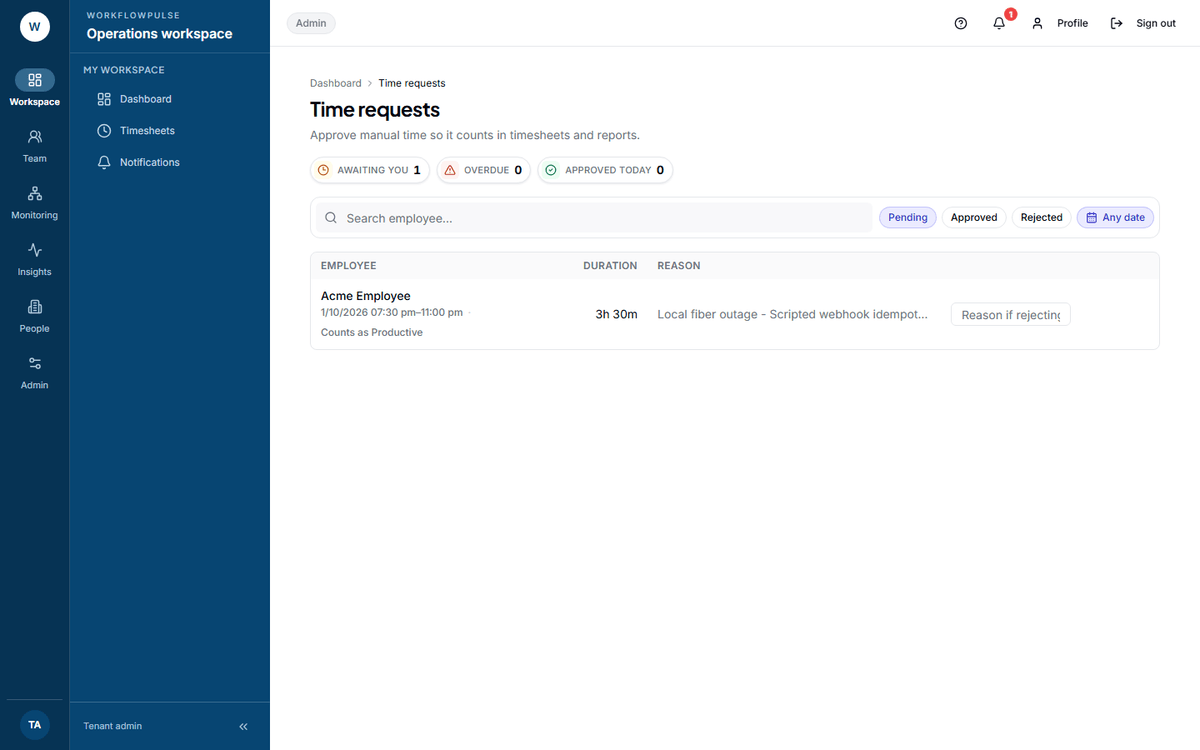 The decision happens on the row. The reason box in the middle is not optional furniture - Reject stays greyed out until you type in it.
The three figures
Section titled “The three figures”| Figure | What it means |
|---|---|
| Awaiting you | Everything pending. Click it to filter |
| Overdue | Pending for more than 48 hours, counted from when it was sent |
| Approved today | Decisions you have made since midnight |
Deciding
Section titled “Deciding”-
Read the reason. “Client call about the March invoice” is a decision you can make. “Meeting” is not.
-
Check the window. Two hours of manual time in the middle of a tracked afternoon needs explaining.
-
If you need the evidence, press the eye icon - View activity timeline. It opens that person’s day: sessions, applications, idle gaps.
-
Approve, or type a reason and Reject.
Each row carries the person, the duration, the time window, what it counts as, and their reason. A decided row also says who decided it and when.
Rejecting takes a typed reason
Section titled “Rejecting takes a typed reason”The Reject icon stays disabled until you type in the box on the row. Hover it and it tells you: “Type a reason before rejecting.”
That is the product making you do the thing that makes a rejection usable. Write what would make it approvable.
| Good | No detail on what the call was about. Add the client and the subject, then resubmit. |
| Good | This overlaps 14:00 to 15:00, which is already tracked. |
| No use | No. |
Approving takes no note at all.
One at a time
Section titled “One at a time”There is no select-all and no bulk approve. Every request is decided on its own row.
Two things about the filters
Section titled “Two things about the filters”The chips are Pending, Approved and Rejected. There is no “All” - you are always looking at one state.
The date control is labelled “Requested between”, and it filters on the day the work happened, not the day the request was sent. A request made today for last Tuesday is found under last Tuesday.
If the queue is always empty
Section titled “If the queue is always empty”Two possible reasons, and they are opposite.
Manual time is switched off for the workspace. The empty state says so: “New manual-time requests are disabled for this workspace. Pending requests will remain available here for review.”
Nobody is using it. That is worth a question in a team that attends a lot of meetings. Hours spent away from a keyboard that nobody adds are hours that silently disappear from every report you read.
Who can decide
Section titled “Who can decide”Managers and tenant admins.
An auditor sees the whole queue and gets no buttons: “You can view time requests. Approving or rejecting requires a manager or admin role.”