Wellness
Is anybody carrying too much, and has anybody got room to take more?
Wellness (/reports/wellness), titled “Wellness & Workload Balance” on screen.
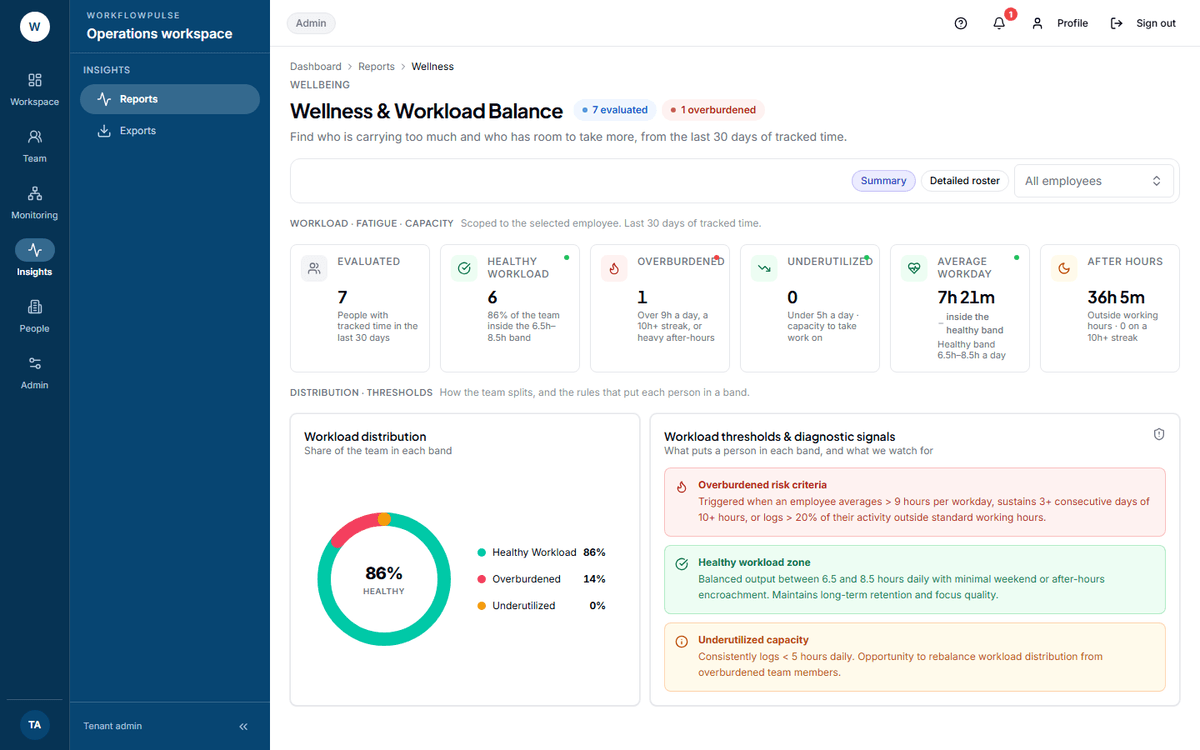 The three threshold panels are printed on the screen itself, so the rule that put somebody in a band is never a mystery. This is the only report in the product that shows its own working.
What question it answers
Section titled “What question it answers”Who is carrying too much, and who has room to take more — from the last 30 days of tracked time.
It is the only screen in the product pointed at the person rather than at the output.
Where the numbers come from
Section titled “Where the numbers come from”Tracked time per person per workday across the last 30 days, with three signals pulled out of it: the average workday length, the share of activity outside standard working hours, and the longest run of consecutive ten-hour days.
It is built from tracked time only. Nothing a person says about their workload reaches this report.
The thresholds, as the product states them
Section titled “The thresholds, as the product states them”These are printed on the screen, not inferred.
Any one of the three overburdened conditions is enough on its own. A person with an eight-hour average and heavy weekend work lands in the band just as a person at ten hours a day does.
The six tiles
Section titled “The six tiles”Evaluated, Healthy workload, Overburdened, Underutilized, Average workday, and After hours with the count of people on a ten-hour streak.
Overburdened is the one with a name behind it. Everything else on the page is context for it.
The roster
Section titled “The roster”Switch to Detailed roster for the list: Employee, Workload status, Avg / workday, After hours, Weekend, 10h+ streak.
What this report is for
Section titled “What this report is for”It finds the thing that becomes a resignation two months later.
The underutilized half matters too, and is the half people skip. Somebody at four hours a day is either blocked, under-assigned, or already halfway out of the door. All three are better found now.
What it does NOT include
Section titled “What it does NOT include”No date control. Always the last 30 days, hard-coded. There is no way to ask about last quarter.
No export. No button, and no report type behind it on the Exports screen either. What you can take away is a screenshot.
No team filter, and the employee picker narrows the roster only — the six tiles above stay whole-workspace.
Nothing is sent to the person. An employee cannot see their own wellness row. If you want somebody to know they have had four ten-hour days, you have to tell them.
It does not know why. A release week, a house move and a crisis all look the same here.
What to do with what it shows
Section titled “What to do with what it shows”Somebody on a 10h+ streak — this week, not at the next review. The value of this report is entirely in how quickly you act on it.
A rising After hours figure across the team — that is a planning problem, not several people problems.
Somebody underutilized — ask what they are blocked on before you assign more. Half the time the answer is that they are waiting on somebody else.
Next: How the team is doing · Scorecard