Alerts and goals
What gets people told, and what are they measured against?
Two separate features on two screens. Alerts push a message. Goals sit on a dashboard.
Alerts
Section titled “Alerts”Alerts (/alerts), the New alert form. Creating and changing rules is tenant admin only — everybody else sees “Viewing only — ask a tenant admin to manage Slack, create alerts, or edit alert rules.”
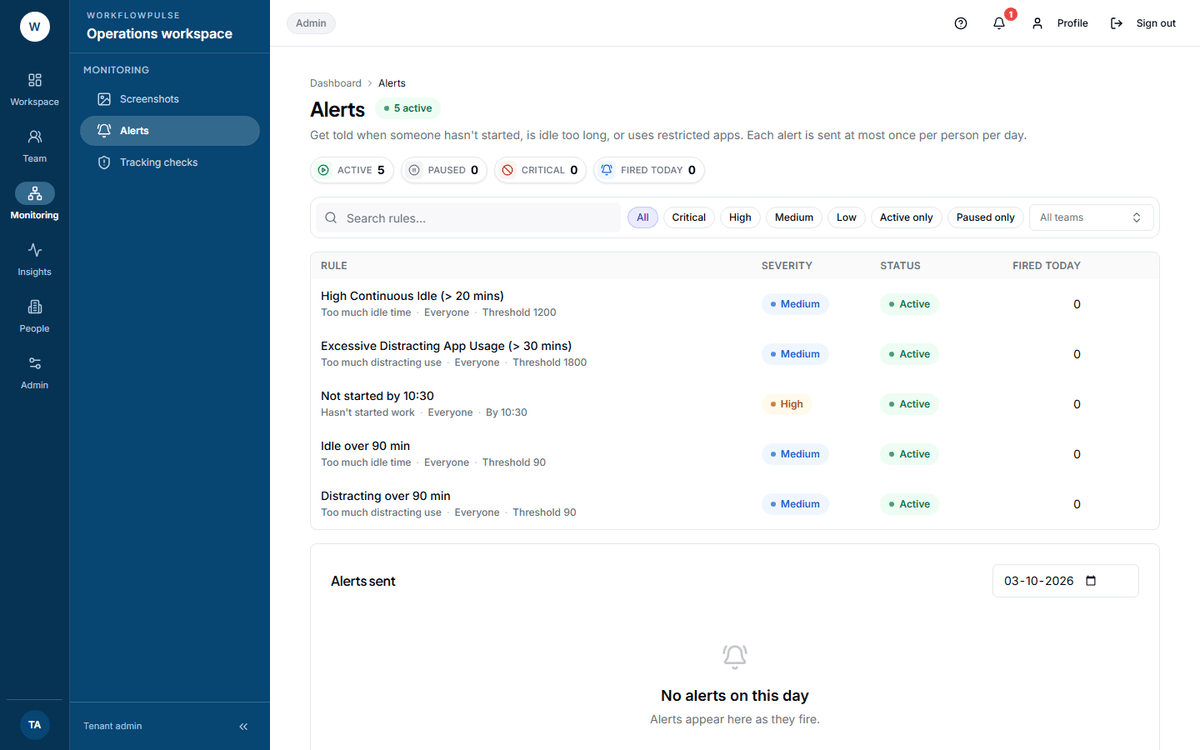 Two lists on one screen that are easy to confuse. The top one is the rules you built. The bottom one is what actually fired, and it is a record, not a queue.
The five rules you can build
Section titled “The five rules you can build”| When | Threshold field | Default | Severity |
|---|---|---|---|
| Hasn’t started work | By (HH:MM) | 10:30 | High |
| Too much idle time | Idle minutes | 60 | Medium |
| Too much distracting use | Distracting minutes | 45 | Medium |
| Low productivity | Target % | 50 | Low |
| Uses a restricted app or site | Minutes before alerting | 1 | Critical |
The restricted-app rule also takes a comma-separated list of apps or websites, which is required — the placeholder shows the shape: steam, netflix.com.
Then three more choices:
- For — a team, or Everyone
- Tell — Their manager (the default) or All admins
- By — In-app and email (the default), In-app only, Email only, or Slack and in-app
Paste an incoming webhook. It must start https://hooks.slack.com/ — anything else is refused with “Must start with https://hooks.slack.com/”.
One webhook per workspace, used by every rule set to Slack delivery. The card shows Connected. or Not connected.
Three things alerts cannot do
Section titled “Three things alerts cannot do”A fired alert cannot be acknowledged or resolved. The only action on a sent alert is View rule, which scrolls up and highlights the rule that fired it. The sent list is a record, not a work queue — nothing tracks whether anybody did anything about it.
Severity is not yours to set. It is worked out from the type alone: restricted app is critical, missed start is high, idle and distraction are medium, low productivity is low. It is a grouping for the filter chips, not a field.
Productivity rules (/settings/productivity) → Goals.
A goal is one metric and a daily target:
- Goal — Productive time or Active time
- Hours per day — from 0.5 to 24, in half-hour steps, starting at 6
- For — a team, or Everyone
An employee with a goal sees a Today’s goals card on their dashboard with their progress against it. Goal achievement also feeds the Goals met pillar on the Scorecard and the attention findings on a manager’s dashboard.
If no goal exists, the Goals met pillar on the Scorecard is scoring nobody — and it still counts towards everybody’s composite.
Setting a target that means something
Section titled “Setting a target that means something”6 to 6.5 hours of productive time a day is a real target for a person with meetings. Eight is the length of the day, not the amount of focused work in it, and a target nobody reaches is a target everybody ignores.
Set one goal for Everyone before you set one per team. A goal per team invites a comparison the goal was not designed for.
The order to build them in
Section titled “The order to build them in”-
Classify first. An alert on low productivity, raised against a rule set that does not know your tools, is noise that costs you trust. Get unclassified under 10% on App and website use before any rule exists.
-
One alert. The one answering a question somebody actually asks — usually “has everybody started?”
-
One goal, workspace-wide, on active time.
-
Wait a fortnight. Read the Fired today tile and the sent list. Count what fired and whether anybody acted on it.
-
Adjust the threshold, not the team. A rule firing for nine people out of eleven is a wrong threshold.
-
Only then add a second rule.
Next: Alerts · Apps and websites