The audit log
What changed, and who changed it?
Audit logs (/audit-logs). The line under the title is accurate: “Every recorded change in your tenant, newest first.”
Tenant admins and auditors. A manager is refused: “Audit logs needs the tenant admin or auditor role.”
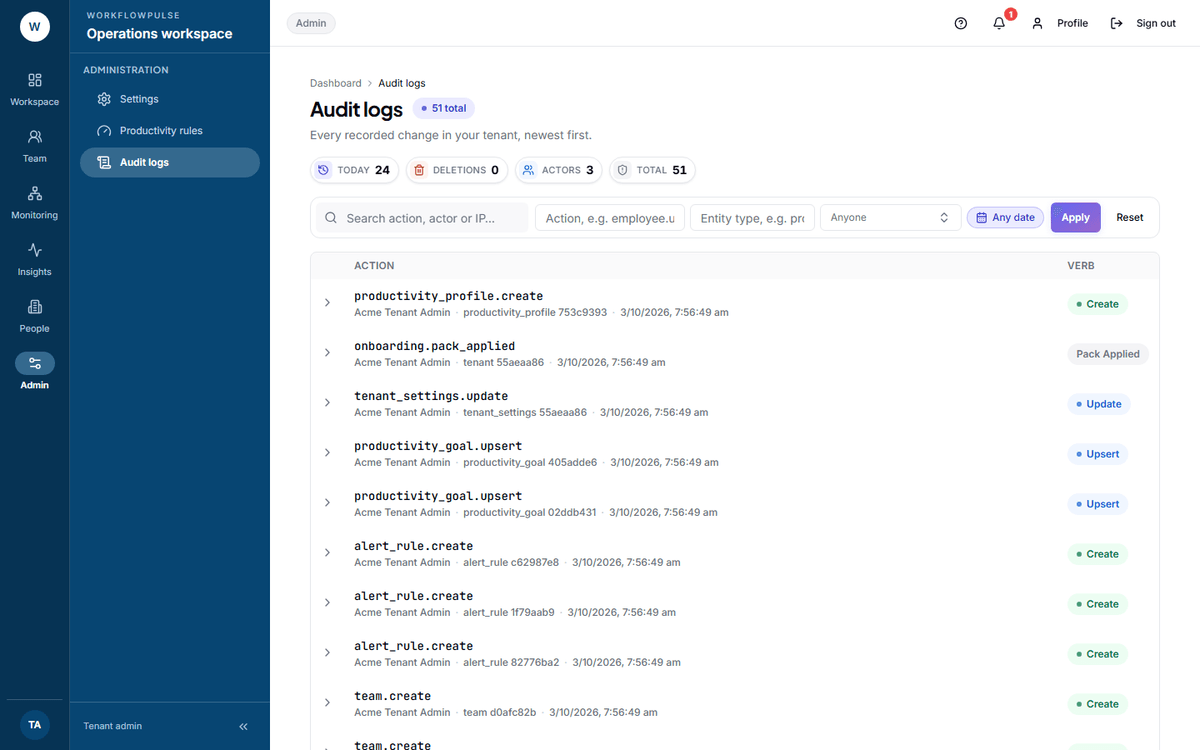 The verb badge is worked out from the last word of the action name, so a delete is red at a glance. Expand any row for the before-and-after pair, which is what people actually come here for.
What a row holds
Section titled “What a row holds”| Part | What it is |
|---|---|
| Action | A dotted name — employee.update, project.delete, screenshot.upload |
| Verb | A badge worked out from the last word. Red for delete, green for create |
| Actor | Who did it, or “system” |
| Entity | The kind of thing and the first part of its id |
| IP and time | Where from, and when |
Expand a row and you get three more things: a Before panel, an After panel, and the browser the change came from. A panel reads — where there was nothing — a create has no before, a delete has no after.
Answering “who changed this”
Section titled “Answering “who changed this””- Put the thing in Entity type —
project,employee,tenant_settings. - Set the Audit window to the period in question.
- Pick the person in the Actor list if you already suspect one.
- Press Apply, then expand the row and read Before against After.
What it does record
Section titled “What it does record”- Configuration changes, with before and after
- People created, invited, updated, deactivated
- Projects and tasks created, changed, deleted
- Timesheet decisions
- Screenshots uploaded and deleted
- A manager or admin requesting an on-demand screenshot, with both names
What it does not record
Section titled “What it does not record”Say these before a compliance review, because the question comes up.
Failed attempts. There is no denied or refused outcome in the table. A blocked action leaves nothing behind, so a person probing for access they do not have is invisible here.
Severity. Every row is equal. Deleting every project and renaming one look the same until you read them. There is no filter for “important”.
Two things the screen itself cannot do
Section titled “Two things the screen itself cannot do”Paging is 50 rows at a time with Previous and Next, and no jump. A long investigation is a lot of Next. Narrow with the fields first.
How long it is kept
Section titled “How long it is kept”The nightly retention job deletes screenshots, activity, app records, idle events and integrity checks. Audit logs are not in that list. They are kept for the life of the workspace.
That is the right way round: the record of who changed the policy outlives the data the policy governed.