Choosing your industry
Which ready-made setup fits your company?
One question separates them.
Does a person pick a named piece of work before they start working?
A developer picks a ticket. An auditor picks an engagement. A contact centre agent does not — the call arrives. That answer sets the work mode, and the work mode sets most of the rest.
The five packs
Section titled “The five packs”| Pack | For | Work mode | Screenshots | Idle after | Kept for |
|---|---|---|---|---|---|
| IT services | Software delivery, product teams, managed services | Task based | Every 5 min | 10 min | 90 days |
| BPO and contact centre | Voice, chat and back-office queues | Productivity only | Every 10 min | 5 min | 365 days |
| Accounting and professional services | Audit, tax, advisory | Task based | Every 5 min | 10 min | 365 days |
| Agency and creative studio | Design, content, marketing | Task based | Every 10 min | 10 min | 90 days |
| Healthcare back office | Coding, AR, eligibility, claims | Productivity only | Off | 5 min | 365 days |
The product’s own defaults, for comparison: task based, screenshots every 5 min, idle after 3 min, kept for 90 days.
There is a sixth choice: start blank. You then set everything yourself. It is never the suggested card, and most people should not take it.
What a pack actually creates
Section titled “What a pack actually creates”A pack is a set of answers to decisions you would otherwise make alone across six screens. These are the real counts, from the pack files themselves.
| Pack | Productivity roles | App rules written | Teams | Alert rules | Daily goal |
|---|---|---|---|---|---|
| IT services | 5 | 480 | 3 | 3 | 360 productive min, plus 420 active min |
| BPO and contact centre | 4 | 384 | 3 | 4 | 390 productive min |
| Accounting | 4 | 384 | 3 | 3 | 360 productive min |
| Agency and creative | 4 | 384 | 3 | 2 | 330 productive min |
| Healthcare back office | 4 | 384 | 3 | 4 | 390 productive min |
The rule counts look large because every role gets a verdict on every app. The standard catalogue holds 96 applications and websites, and a role is a complete list of 96 answers — productive, neutral or distracting — not a short list of exceptions. Four roles is 384 decisions the pack makes so you do not have to.
Plus, in every case: the work mode, the screenshot interval, the idle threshold and the retention period.
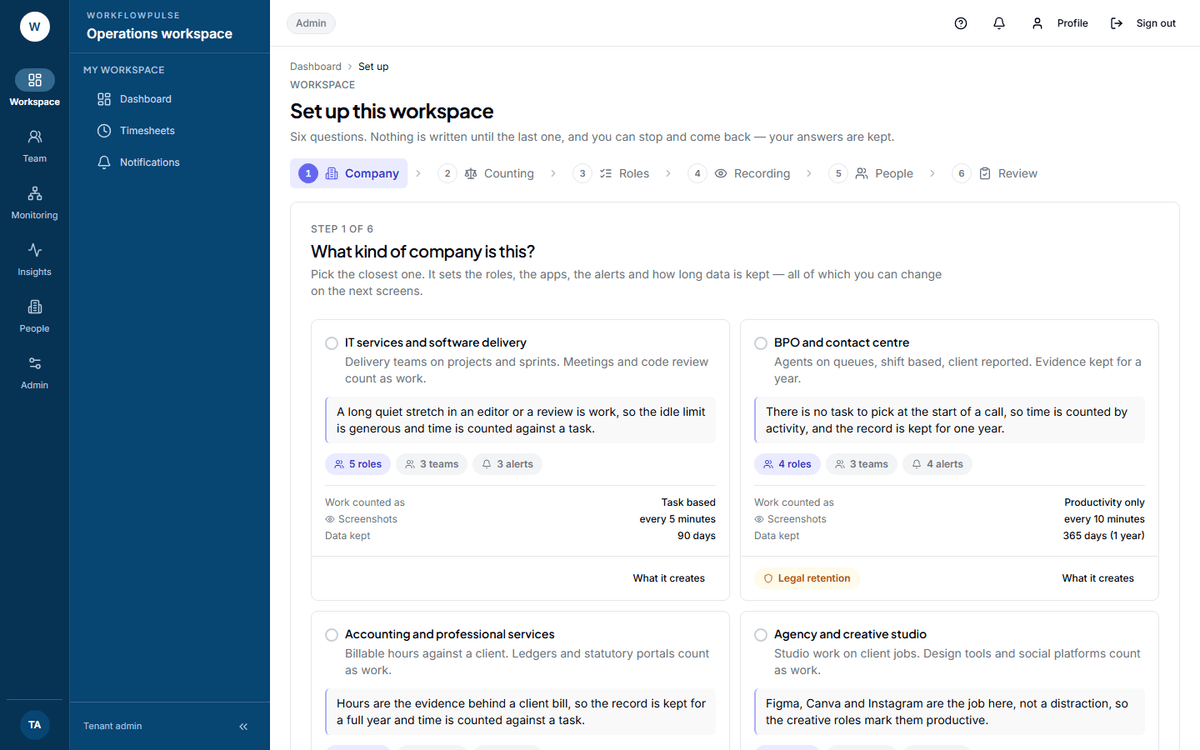 Each card carries the settings it will apply, so the choice is made with the consequences visible
rather than from the name alone.
What is safe, and what is not
Section titled “What is safe, and what is not”Three things make the choice low risk.
You see the whole list before anything is written. The review step names every role, team, alert and goal about to be created, and every setting about to change, with the old value beside the new one.
A pack never overwrites what you already have. If a role or a team of that name exists, the pack skips it and tells you it did, on a line of its own.
Applying the same pack twice creates nothing the second time. The workspace remembers what was applied and returns the same counts. You cannot double it by pressing the button again.
The one choice you cannot undo
Section titled “The one choice you cannot undo”Everything a pack creates can be edited afterwards — roles, teams, alerts, goals, intervals, retention. One thing cannot.
Next: Setting up a workspace · Task based or productivity only