Insights
What does last week’s data say, in words?
Insights (/reports/insights), titled “Weekly AI Insights”. It is the only report that writes sentences instead of drawing numbers.
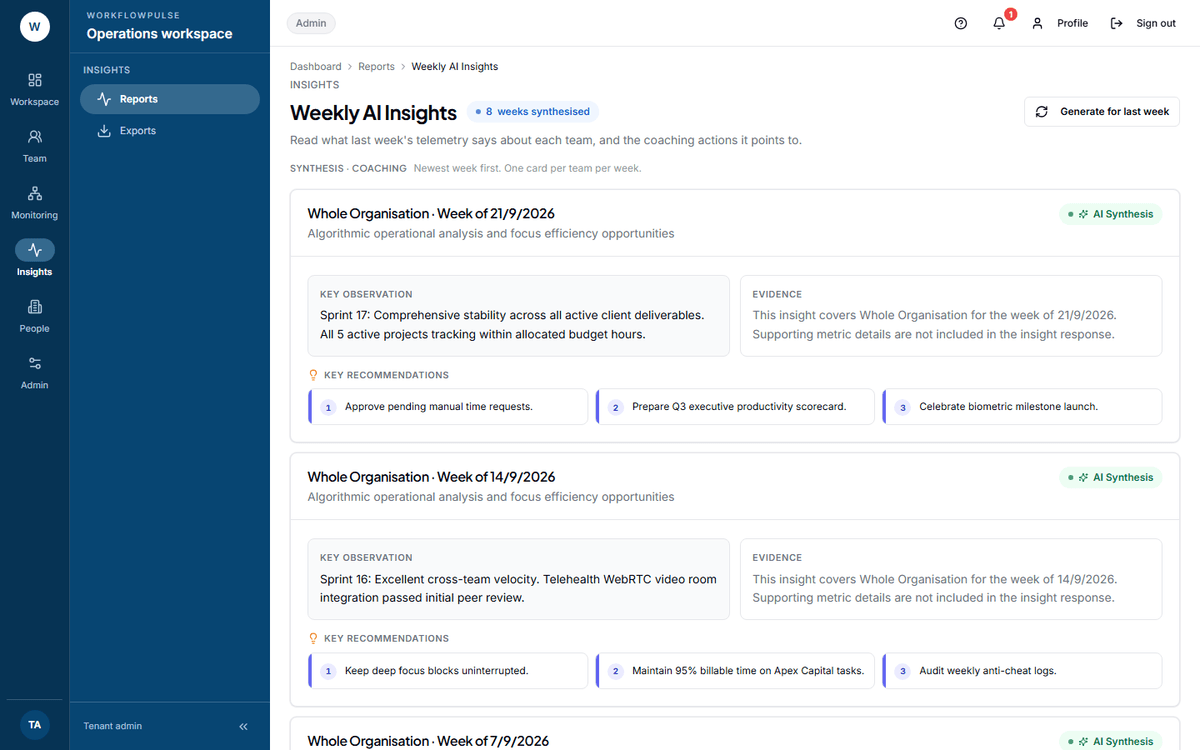 One card per team per week, newest first. Read the observation, then go and open the report behind it — the card itself carries no figures to check it against.
What question it answers
Section titled “What question it answers”What last week’s telemetry says about each team, and the coaching actions it points to.
Where the numbers come from
Section titled “Where the numbers come from”A background job runs every Monday at 03:00 UTC. For each team it sends that week’s figures — totals only, with no names — to an outside AI service, and stores the sentences that come back.
A tenant admin can also press Generate for last week to produce a card immediately.
Nothing is generated at all until the setting is switched on. See below.
What you get
Section titled “What you get”One card per team per week, newest first. A card for the whole workspace is titled Whole Organisation. Each card has three panels:
- Key observation — the week summarised in a short paragraph
- Evidence — see below
- Key recommendations — a numbered list of suggested actions
The Evidence panel holds no evidence
Section titled “The Evidence panel holds no evidence”Switching it on
Section titled “Switching it on”The empty state tells you where: “Turn on AI insights in Settings → Productivity rules. Weekly summaries automatically generate every Monday.”
The switch is Productivity rules → Tracking and privacy → “Send weekly team figures (no names) to Claude for an AI summary”.
What it does NOT include
Section titled “What it does NOT include”No filters at all. No date range, no team picker, no employee picker. The screen has no toolbar. You read what is there.
No export, and no report type behind it.
No per-person insight. Teams and the whole workspace only — which follows from sending figures with no names.
No way to correct a card. If an observation is wrong, there is nothing to edit and nothing to dismiss. It stays in the list.
Nothing about this week. The job runs on Monday for the week that has finished.
What to do with what it shows
Section titled “What to do with what it shows”It is a prompt, not a conclusion.
The value is that it reads every team’s week when nobody has the time to, and names the two or three worth opening. That is a real saving on a Monday morning.
Read the observation, open the report behind it, and form your own view. Then act on the report, not on the card.
Next: How the team is doing · The reports, and which one to open