Billing reports
What can you invoice, and what did it cost to produce?
Two reports. Both are task-based only, and both disappear in a workspace that counts productivity rather than tasks.
| Report | The question | Who can open it |
|---|---|---|
| Monthly client billing | What does each client owe this period? | Tenant admin and auditor only |
| Resource billing | What does each person cost, and where did their hours go? | Manager, tenant admin, auditor |
A manager cannot open monthly client billing. That is deliberate.
Read this before you invoice from either
Section titled “Read this before you invoice from either”Monthly client billing
Section titled “Monthly client billing”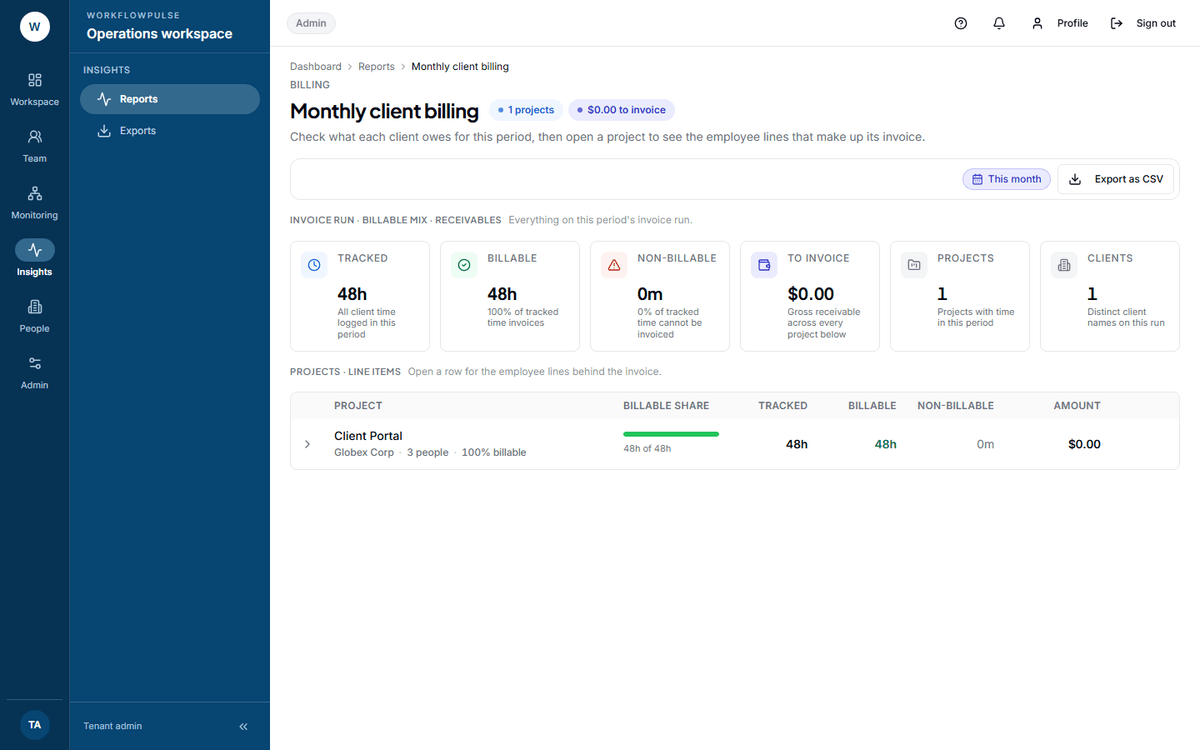 The expanded row is the part worth knowing about. It is the per-person breakdown a client asks for when they query a total, and it is one click away rather than a second report.
What question it answers. What does each client owe for this period, and which projects make up that total?
Where the numbers come from. Every time log in the period that carries a project. Billable minutes are those flagged billable by the tracker. The amount is billable minutes times the hourly rate, worked out per person per project.
Six tiles: Tracked, Billable with its share, Non-billable, To invoice, Projects, Clients.
The table is one row per project — billable share, tracked, billable, non-billable and amount. Open a row and it expands to the employee line items behind that project’s invoice, each with their own tracked, billable and amount.
What it does not include. Time with no project at all — the report requires one. Approval, as above. And despite the name, there is no month box on it: the control is the same date-range picker as every other report, defaulted to this month. Pick the wrong range and you will invoice the wrong days.
Resource billing
Section titled “Resource billing”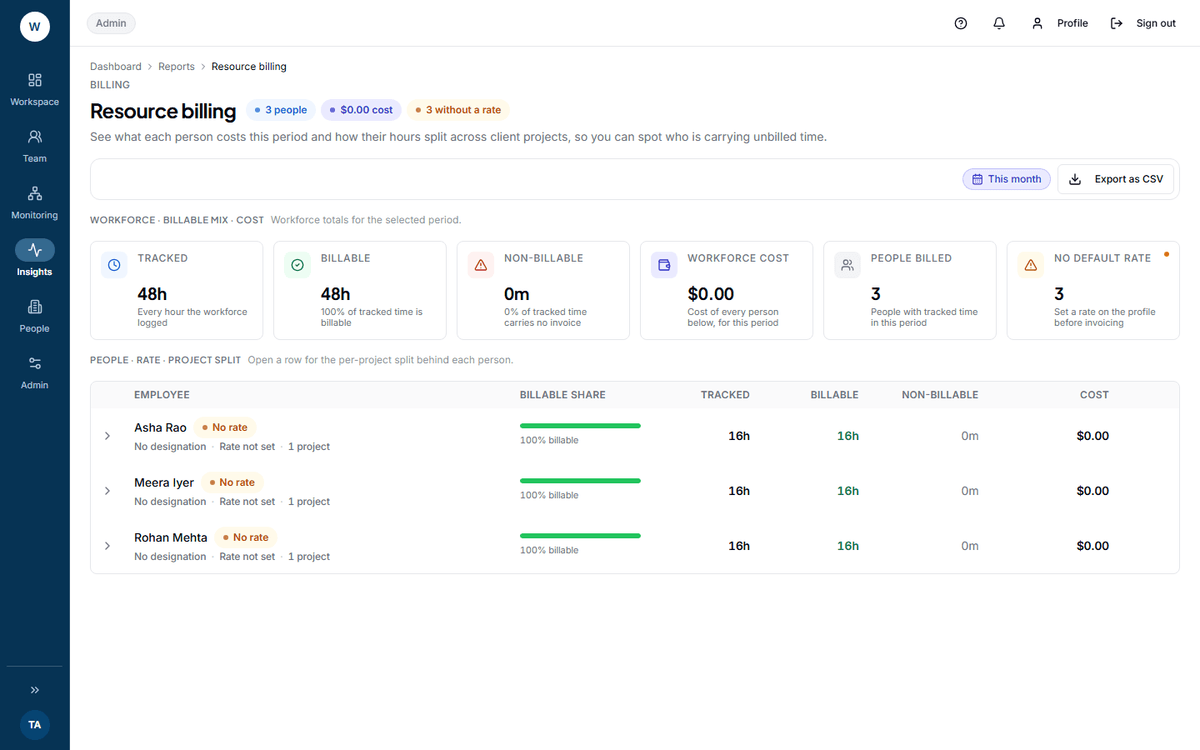 The sixth tile, No default rate, is the one to read first. Anybody counted in it is being costed at zero and is quietly flattering every margin on the screen.
What question it answers. What does each person cost this period, and how do their hours split across client projects?
Where the numbers come from. The same time logs, grouped by person instead of by project. Workforce cost is billable minutes times each person’s effective rate.
Six tiles: Tracked, Billable, Non-billable, Workforce cost, People billed, No default rate.
The table is one row per person, with their designation, rate and project count. A person with no rate shows a No rate chip; one with no designation shows No designation. Open a row for their split across projects.
What it does not include. No employee picker and no project picker — the period is the only control. People with no tracked time in the period are absent, so this is not a headcount.
How a rate is found
Section titled “How a rate is found”Three steps, first match wins:
-
The rate set for that person on that project — the project-member override.
-
The project’s default rate.
-
The person’s own rate on their employee record.
None of the three means a rate of zero, and the hours are costed at nothing. Only resource billing counts the people this affects; the client billing screen stays silent.
What to do with what it shows
Section titled “What to do with what it shows”A high non-billable share is a scoping conversation, not a performance one. Find the project, open its row, and look at which people are carrying it.
A client total that moved a lot month on month — expand the project rows and compare the employee lines. The breakdown usually names the reason before you have to ask anybody.
A person in No default rate is a five-minute fix on their employee record that repairs every cost figure in the product.
Export
Section titled “Export”Both screens offer Export as CSV, which queues a job and moves you to the Exports screen.
A month-end sequence that works
Section titled “A month-end sequence that works”-
Every project has a client name. Check for Unassigned client on Project summary and fix it at the project, not in the spreadsheet afterwards.
-
Every person has a rate. Open Resource billing and confirm No default rate reads zero.
-
Every timesheet for the period is approved on Timesheets. This is the step the reports do not do for you.
-
Read Monthly client billing, and expand the rows you intend to invoice.
-
Export a PDF, write the period on it, and keep it with the invoice.
Next: Project summary · Approving timesheets