Teams
How do you group people, and why does a team look empty?
Teams are on Teams (/teams). Managers and auditors can read it. Only a tenant admin can change anything.
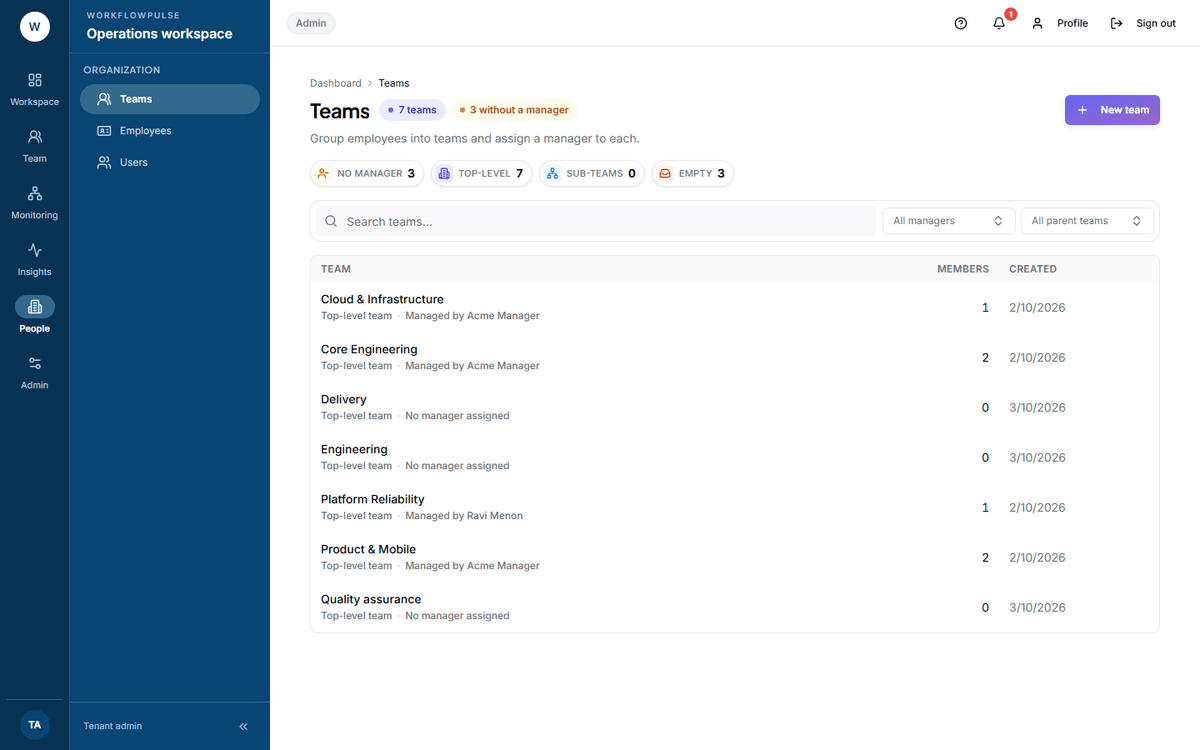 The four tiles are the whole diagnostic. No manager and Empty both above nought usually means somebody built the structure and never connected it to anybody.
Making one
Section titled “Making one”Press New team. Three fields:
- Name
- Parent team — leave on None for a top-level team
- Manager — who is accountable
That is the whole team.
Membership is not set here
Section titled “Membership is not set here”Four figures that find a broken structure
Section titled “Four figures that find a broken structure”Each of the four across the top is a link to the rows behind it.
| Figure | What it means | Fix |
|---|---|---|
| No manager | A team nobody is accountable for | Edit it and set a manager |
| Top-level | Teams with no parent above them | Normal, unless you expected a hierarchy |
| Sub-teams | Teams nested under another | — |
| Empty | No employee record points at it | Set the team on each person |
The Empty tile says it exactly: “No employee’s HR record points here yet.”
What a team is used for
Section titled “What a team is used for”- The reporting line for approvals
- Productivity role assignment — a whole team can share one rule set
- Alert rules, which can be aimed at one team
- Goals, which can be set for one team
- A filter on the alerts screen
What is missing
Section titled “What is missing”There is no team detail page. The team name is plain text, not a link. Everything about a team is on its one row.
Deleting a team uses the browser’s own confirm box — Delete team “Design”? — and does not tell you how many employee records point at it. Check the Members count before you press it.
A team cannot be moved in bulk. Changing a parent is a per-team edit.
A structure that works
Section titled “A structure that works”- One team per manager. A team without a manager is a label, not a team.
- Use a parent team only when you genuinely have two levels. Nesting that reflects nothing costs you clicks for ever.
- Set the team on each employee record on the day they join, with their manager and their rate. All three live on the same screen, so it is one visit.
- Check Empty is zero before you trust any approval routing.
Next: People and roles · Productivity roles